This month's release is a big one for coordination teams. We've shipped two features that directly address what slows daily meetings down: a limited planning horizon, and no way to quickly see which tasks have been updated.
Multiple Weeks on Board lets you plan across a 1–4 week horizon in a single, continuous Board layout, and Daily Update Compliance gives you a live, at-a-glance view of exactly which tasks are on track, delayed, or missing an update.
We think these updates will transform how you use Aphex for your coordination meetings, so let’s dive in!
Stay Ahead of Handovers with Multiple Weeks on Board View
Board View has always been the go-to for weekly coordination, replacing the traditional whiteboard planning. But it had one limitation: you could only see one week at a time. For teams managing handovers, planning ahead for constraints, or running sessions that span more than the current week, that was a real ceiling.
Multiple Weeks on Board changes that, and here's how it works.
1. Choose how many weeks to display
Open Board View and use the new Week Selector at the top to choose how many weeks you want to show - anywhere from 1 to 4.
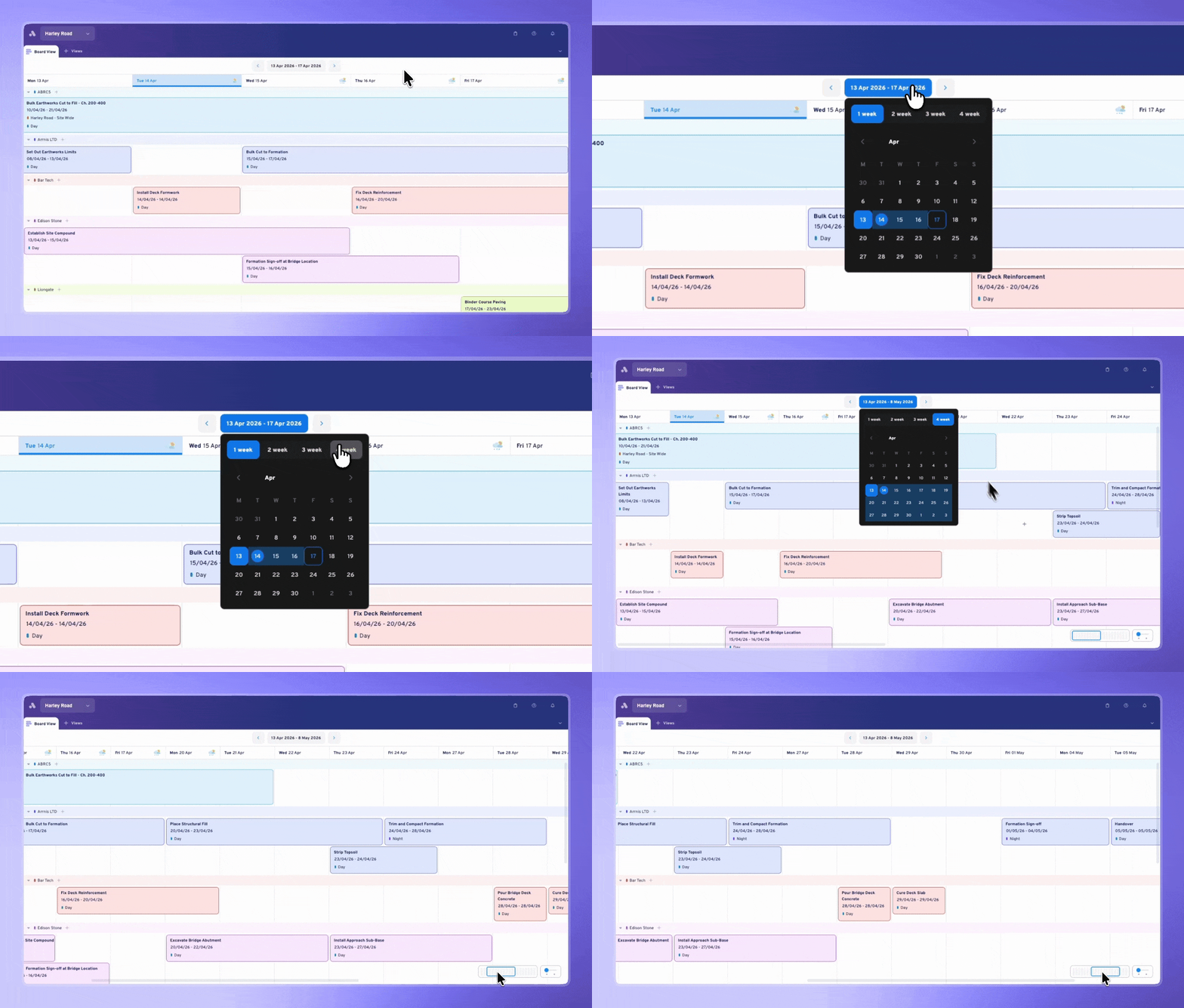
Set a custom week start day to match your project's planning rhythm, and hit the Today button at any time to snap straight back to the current week.
2. Customise your screen view
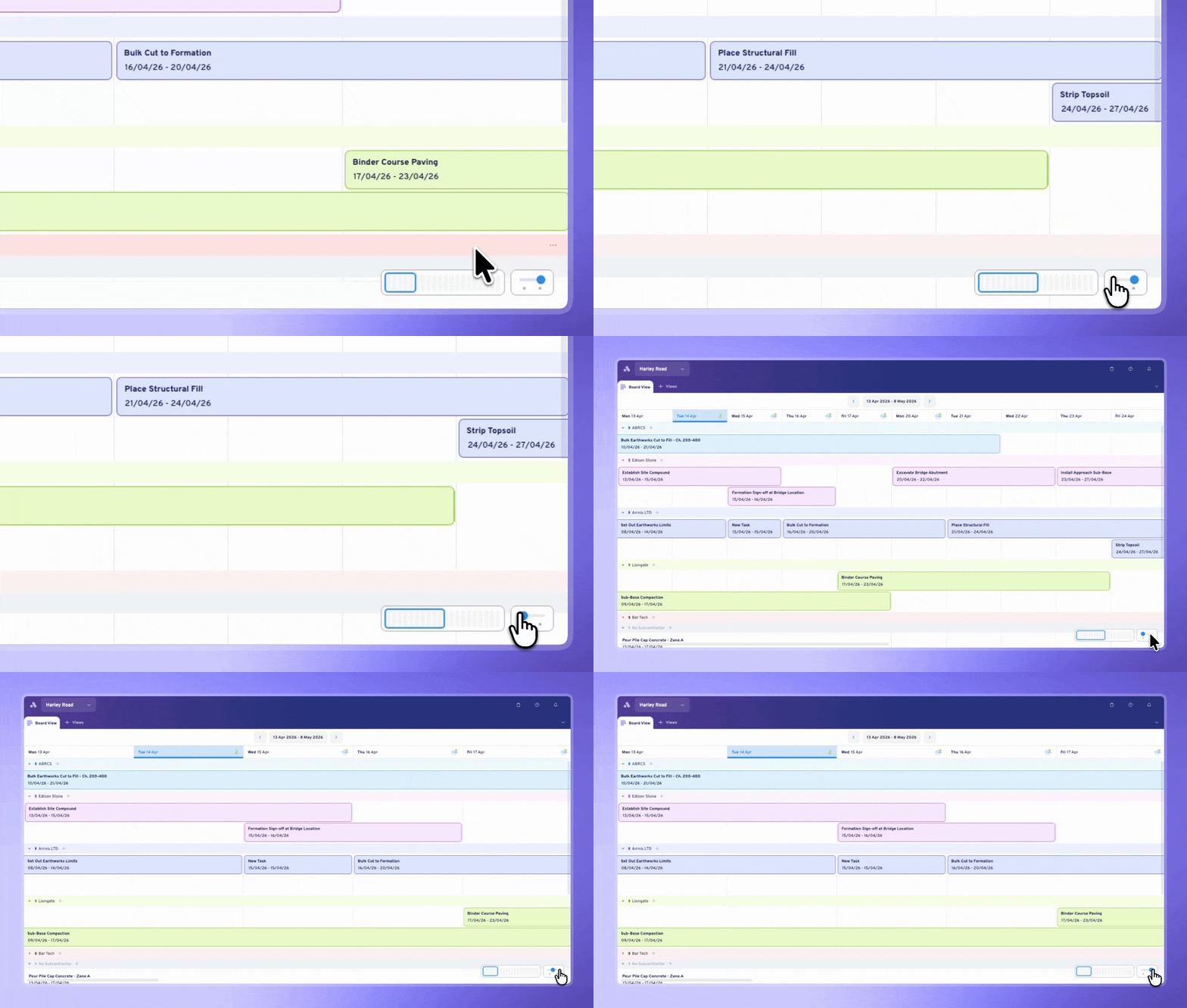
Use the Zoom Slider in the bottom right to switch between 1 or 2 weeks visible on screen. Zoom in to 1 week for a detailed daily task review, or zoom out to 2 weeks when you're looking ahead at handovers or constraints. When you're on a site TV, the wider view gives the whole room what they need at a glance.
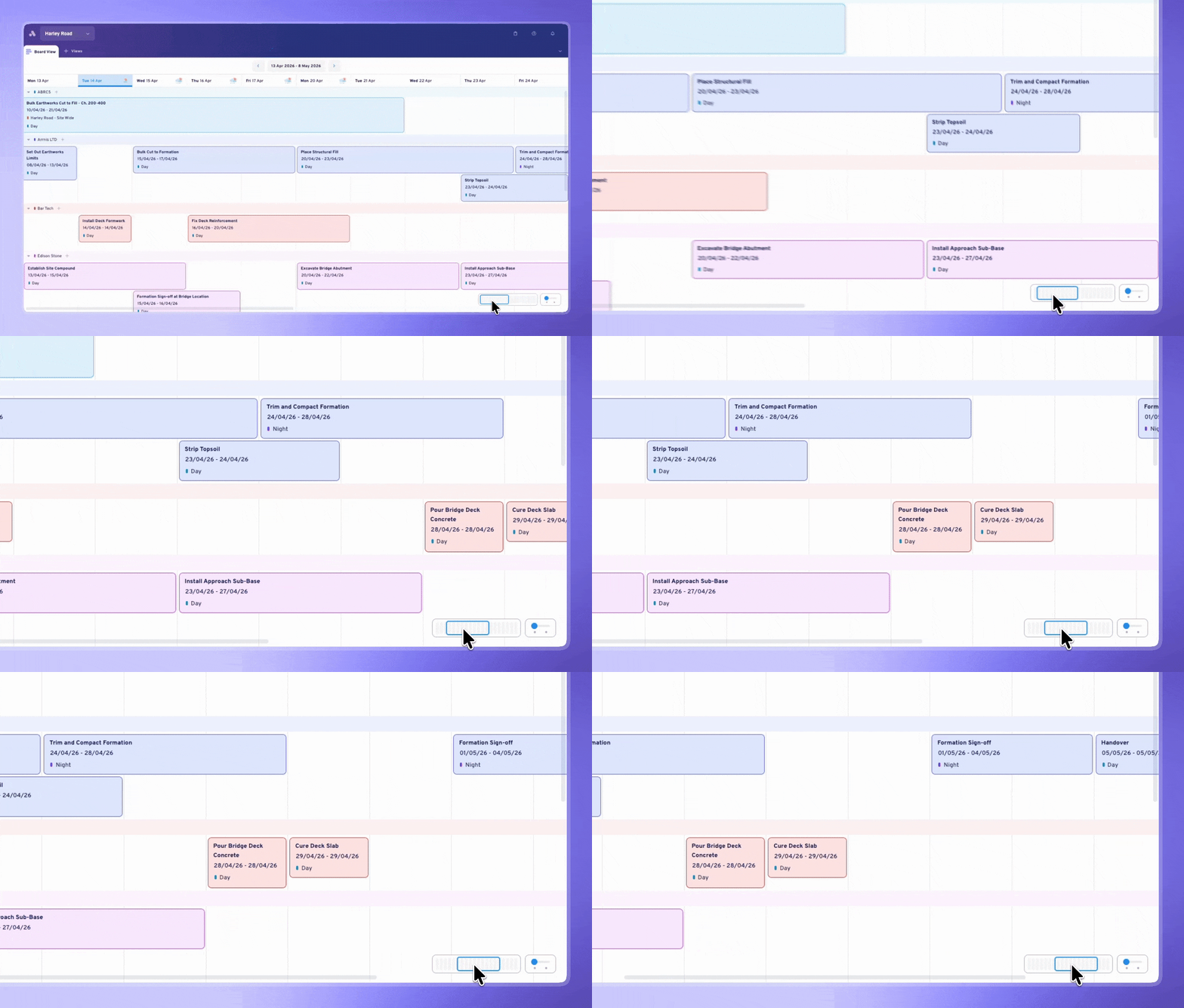
3. Scroll ahead to plan across weeks
Use the horizontal scroll bar to move forward through your programme without switching views. Spot upcoming constraints, check what's landing in the next handover period, and stay oriented - all in Board View.
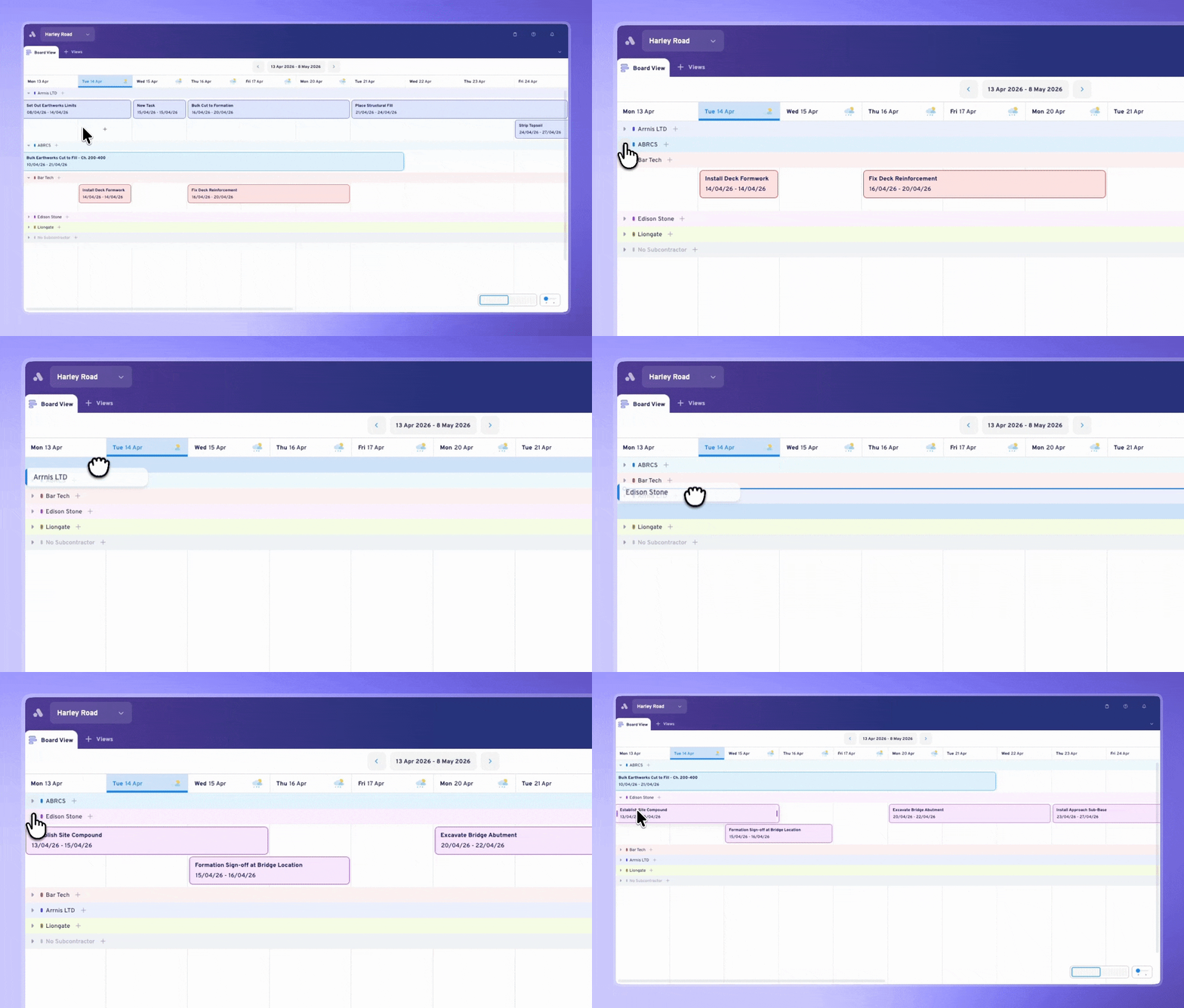
4. Manage your groups inline
The left-hand panel is gone. Grouping now sits as inline rows across the Board, giving tasks more space. Collapse groups to cut the noise during a coordination meeting — focus the conversation on just the crew or trade that needs attention. Drag and drop to reorder groups on the fly.
5. Tidy up after changes
Once you've rearranged tasks, hit Tidy Up in the bottom right to snap everything back into a clean layout.
6. Print your Board
When you're ready to print, you can now export a PDF at A2 size - ready to stick straight on the wall.
Multiple Weeks on Board means your coordination meeting has a proper home in Aphex. Run the session, plan ahead for handovers, spot constraints before they land, all without leaving Board View. Less switching, more doing.
Daily Status Compliance on Board & List
In a daily planning cadence, tasks need to be updated every day. But until now, there was no quick way to see which tasks had been updated and which ones hadn't. Daily Status Compliance solves this by adding a live compliance summary at the top of both Board and List Views.
How it works
1. View progress at a glance
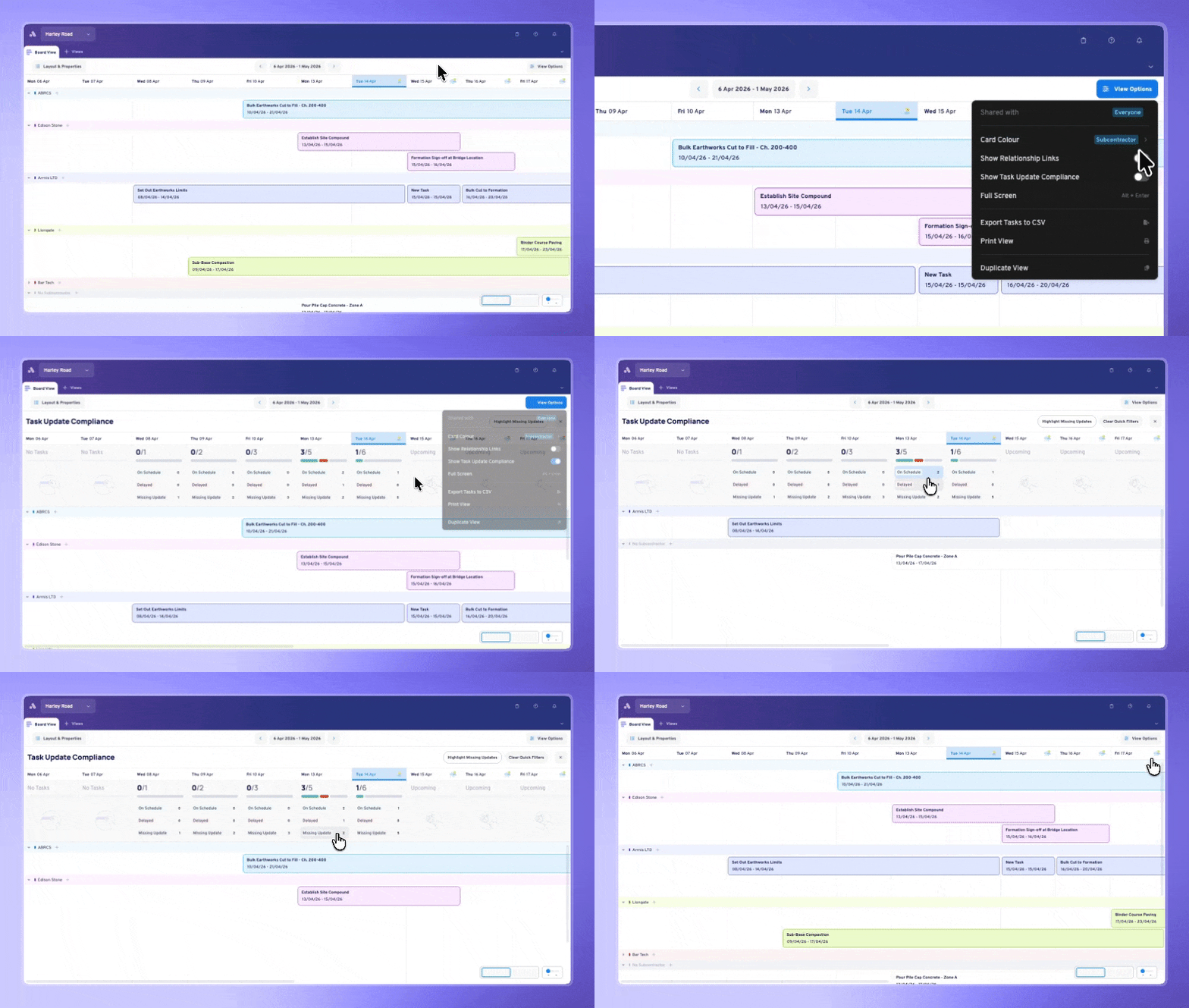
Enable the feature by toggling on ‘Task Update Compliance’ in the ‘View Options’ dropdown. Once enabled, at the top of each day column in Board View (or across the top of List View), you'll see a progress bar and a breakdown across three categories:
- 🟢 On Schedule - Tasks that have received a positive update today
- 🔴 Delayed - Tasks flagged with a negative update
- ⚫ Missing Update - Tasks that should have been updated but haven't been
The bar is proportional, so at a glance, you can see the shape of the day before diving into detail.
2. One click to the problem
Click any category row and the view instantly filters to just those tasks. See which tasks are delayed, action them, then clear the filter in one click. A "Highlight Missing Updates" button gives you a shortcut to the most common daily action, chasing down what hasn't been touched yet.
3. Make progress updates directly in List View
Once you have identified tasks with missing information using Task Update Compliance, you can easily add progress updates to tasks in List View. Everything updates in real time, so as tasks get statused, the bar adjusts immediately.
4. Hide the feature once complete
Once you've reviewed compliance and you're ready to move on, hit the X button to dismiss the bar, or toggle it off from View Options. It's a per-user setting, so your view won't affect anyone else's.
Multiple Weeks on Board expanded how far ahead you can plan. Daily Status Compliance tightens how accountable your team is day-to-day. Together, they transform Board View from a visual planning surface into a true daily operating surface: plan across weeks, execute and track every day!
What Else is New in Aphex
Aside from Multiple Weeks on Board and Daily Update Compliance, there's a few more exciting features that have recently landed in Aphex:
Spotlight Mode
.gif?width=1196&height=720&name=Spotlight%20mode%20(1).gif)
Understanding how tasks connect on a Gantt can be one of the hardest things to follow - especially on a big programme.
With Spotlight Mode, click any task and see the full chain of related activities highlighted in one click. You can scroll around the plan and even follow the path when it runs off screen, without losing your place.
Present in Full Screen Mode
Take full advantage of your monitors and site TV screens with Full Screen Mode - now available across the Gantt, Map, Board & List Views.
Enable it from View Options (or hit Alt + Enter) and Aphex clears away the buttons and menus at the top of the page, so you can see more of your plan. To return to normal view, just hit Esc.
more discovering mystery lag values day later when reviewing your plan.
Master Schedule Import Permissions
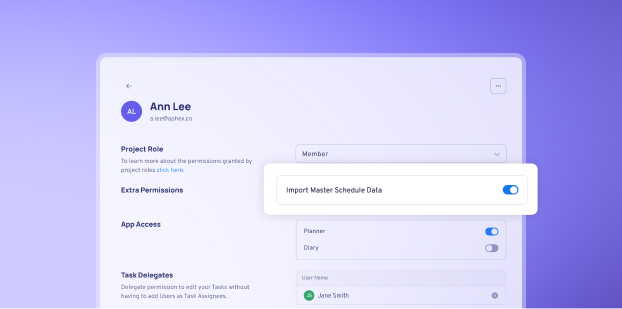
Project admins can now control who runs master schedule imports without needing to adjust someone's full Planner access level. Set this permission per user from the User Panel.
And that's a wrap on our recent updates!
Multiple Weeks on Board, Daily Status Compliance, Spotlight Mode, Full Screen, and a handful of other improvements. All built from the feedback and ideas you've shared with us.
If you have suggestions for what we should build next, you can view the roadmap and make requests directly at aphex.productlane.com/roadmap.